This is what I would like you to have to hand in, printed out and stapled together:
1. The main image people will see when they come to your homepage. If you don't already have an image that you know you want for your homepage, I'd like you to find an image that has the same "feel" as the image you'd like for your homepage (an "aspirational" image for your homepage).
2. The first sentence (or "headline") people will read when they visit your homepage. Try to think of this in terms of "voice" – not just a sentence that introduces people to what your site is "about," but which gives a sense of personality. It's the difference between "This is my photography website" and "As far back as I can remember, I've been in love with light." (Note: maybe, for a portfolio site, you just want to show an image with no text outside of the nabber – if so, write a sentence that will be the first sentence of your "about me").
3. A short paragraph – somewhere between two and five sentences – that people will read after that headline. Something that gives just a little more context for your site.
4. A wireframe (it can be drawn with pencil and paper) of your homepage, indicating what visitors will encounter on your homepage. This is just boxes, which could include things like – logo, main image, news feed, link to social media, etc – include what tabs your navigation bar will have.
Wednesday, February 28, 2018

Tuesday, February 27, 2018
Monday, February 26, 2018
References for Today (Monday 2/26)
We're going to look at the Dreamweaver interface today - if you'd like to install a trial version on your own laptop (the 30-day period should cover what you need to do for class), you can grab it from this page:
https://www.adobe.com/downloads.html
Today, we'll talk about the Box Model:
https://helpx.adobe.com/dreamweaver/how-to/understanding-the-box-model.html
https://www.w3schools.com/css/css_boxmodel.asp
Setting up a site in Dreamweaver:
http://www.dummies.com/software/adobe/dreamweaver/how-to-set-up-a-new-or-existing-site-in-dreamweaver/
CSS in Dreamweaver reference:
https://helpx.adobe.com/dreamweaver/using/css-designer.html
Bootstrap in Dreamweaver:
https://www.adobe.com/downloads.html
Today, we'll talk about the Box Model:
https://helpx.adobe.com/dreamweaver/how-to/understanding-the-box-model.html
https://www.w3schools.com/css/css_boxmodel.asp
Setting up a site in Dreamweaver:
http://www.dummies.com/software/adobe/dreamweaver/how-to-set-up-a-new-or-existing-site-in-dreamweaver/
CSS in Dreamweaver reference:
https://helpx.adobe.com/dreamweaver/using/css-designer.html
Bootstrap in Dreamweaver:
Wednesday, February 21, 2018
Assignment for Monday, 2/26
For Monday's class, I want you to do the following:
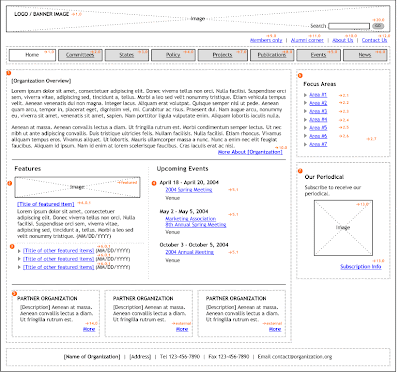
Here is a wireframe example (click to enlarge):
Here is a website flowchart example (you can do a google image search for "website wireframe" and "website flowchart" to see more examples). Click to enlarge:

At the end of the day, the wireframe and flowchart are just boxes – or buckets for the content to be thrown in. You'll eventually make a wireframe and flowchart for your own site, and that will give you a solid guide to know what content you need to assemble and produce to make the site feel "filled out."
Figure out what sort of website you want to make for this class. You'll still have time to adjust/change your mind, but I want to start nudging you to commit to the type of site you'll be making. Is it going to be a photography portfolio site? A site to sell apparel? A travel blog? A journalistic site? An art site?
Decide what "genre" of site you'd like to make, and find three examples of well-designed websites that already exist in that genre. So, if you're making a design portfolio site, find three portfolio sites for designers. And then:
Decide what "genre" of site you'd like to make, and find three examples of well-designed websites that already exist in that genre. So, if you're making a design portfolio site, find three portfolio sites for designers. And then:
1. Write and print out a list: what were the elements you liked about the sites you picked? What are the elements you disliked about the sites? What elements would you like to incorporate into your own site? The could be use of palette, organization, navigation, use of images, use of fonts, etc.
2. Create a wireframe for the homepage of JUST ONE of the sites you picked, as well as a wireframe for one of the "second level" pages (that is, one of the pages you get to by clicking on the nav bar), and a flowchart for the site (refer to the the images below for visual references).
2. Create a wireframe for the homepage of JUST ONE of the sites you picked, as well as a wireframe for one of the "second level" pages (that is, one of the pages you get to by clicking on the nav bar), and a flowchart for the site (refer to the the images below for visual references).
I usually use illustrator for doing up wireframes and flowcharts -- if you have any familiarity with Illustrator, it's a good tool for dealing with text, lines, and boxes.
Photoshop would be fine too -- though if you're unfamiliar with both Photoshop and Illustrator, I'd recommend just drawing these out by hand. Pencil or ballpoint pen on unlined paper would be great (and if you need to, you can steal some unlined paper from the copier on the second floor). Just make sure the names for all the navigation and content are legible.
The wireframe is to give an idea of all the pieces of content you need on a particular page. There might be some layout information in it, but it's far more about content than design. The rationale for asking for two wireframes stems from most sites having homepages that function differently than their "interior" pages, so it's necessary to have at least two wireframes (for first and second tier page functionality) to give an idea of what's going on.
A flowchart, on the other hand, doesn't give an idea of everything that's on a page, but rather gives an idea of how the site as a whole is organized -- how the menu breaks the site into various sections, that may or may not have subsections. You don't need to draw out every single page, but you do need to draw out each section or subsection of your site.
The reasoning behind this exercise is to get you to dig deeply into the site architecture of a site that is trying to solve the same sorts of problems you'll want to solve for your own website. It will hopefully give you some ideas on how to organize your own site (or how not to organize it, as the case may be).
Photoshop would be fine too -- though if you're unfamiliar with both Photoshop and Illustrator, I'd recommend just drawing these out by hand. Pencil or ballpoint pen on unlined paper would be great (and if you need to, you can steal some unlined paper from the copier on the second floor). Just make sure the names for all the navigation and content are legible.
The wireframe is to give an idea of all the pieces of content you need on a particular page. There might be some layout information in it, but it's far more about content than design. The rationale for asking for two wireframes stems from most sites having homepages that function differently than their "interior" pages, so it's necessary to have at least two wireframes (for first and second tier page functionality) to give an idea of what's going on.
A flowchart, on the other hand, doesn't give an idea of everything that's on a page, but rather gives an idea of how the site as a whole is organized -- how the menu breaks the site into various sections, that may or may not have subsections. You don't need to draw out every single page, but you do need to draw out each section or subsection of your site.
The reasoning behind this exercise is to get you to dig deeply into the site architecture of a site that is trying to solve the same sorts of problems you'll want to solve for your own website. It will hopefully give you some ideas on how to organize your own site (or how not to organize it, as the case may be).
Here is a wireframe example (click to enlarge):

Here is a website flowchart example (you can do a google image search for "website wireframe" and "website flowchart" to see more examples). Click to enlarge:

At the end of the day, the wireframe and flowchart are just boxes – or buckets for the content to be thrown in. You'll eventually make a wireframe and flowchart for your own site, and that will give you a solid guide to know what content you need to assemble and produce to make the site feel "filled out."
Wednesday, February 14, 2018
Font Usage
5. Explain how fonts can be used and styled on web pages.
-Fonts are a vital aspect to your webpage design
-Fonts can be styled as normal, italic and oblique
-Font colors, sizing and spacing may be adjusted
How can you prioritize fonts on a webpage, and how can you use a font that a user might not have installed on their own computer?
-CSS List of font families, and the browser will select the first font in the list and go down the list if the font cannot be found or downloaded
-If it's not on your computer, you may use Google Fonts for example.
Explain at least five properties of fonts that can be customized through CSS.
- font- family
- font- size
- font- style (normal, italic, oblique)
- font- weight
- font- variant
Subscribe to:
Posts (Atom)